DataBridge Cloud is currently in closed beta status.
If you're interested in our product, you can make a request for early access by emailing us at hi@databridge.tech.
DataBridge Platform Overview
DataBridge is a platform that unifies event tracking, schema validation, data transformation and data quality monitoring in a single solution. It helps data engineering teams collect, validate, transform and monitor high-quality data from any source to multiple destinations in real-time.
What Makes DataBridge Unique
Unlike traditional customer data platforms (CDPs) that focus solely on event delivery, or data quality tools that only monitor warehouse tables, DataBridge provides data quality across the full pipeline - from ingestion to storage:
- Event Collection & Tracking: Multi-platform SDKs for JavaScript, iOS, Android and server-side environments
- Real-time Schema Validation: Strict JSON schema enforcement to prevent bad data from entering your pipelines
- Data Transformation: Enrich, transform and filter events in real-time before delivery
- Data Quality at Rest: Continuous monitoring, profiling and anomaly detection for warehouse tables
- Unified Platform: One tool instead of juggling Segment/Snowplow + Great Expectations/Soda
Architecture Overview
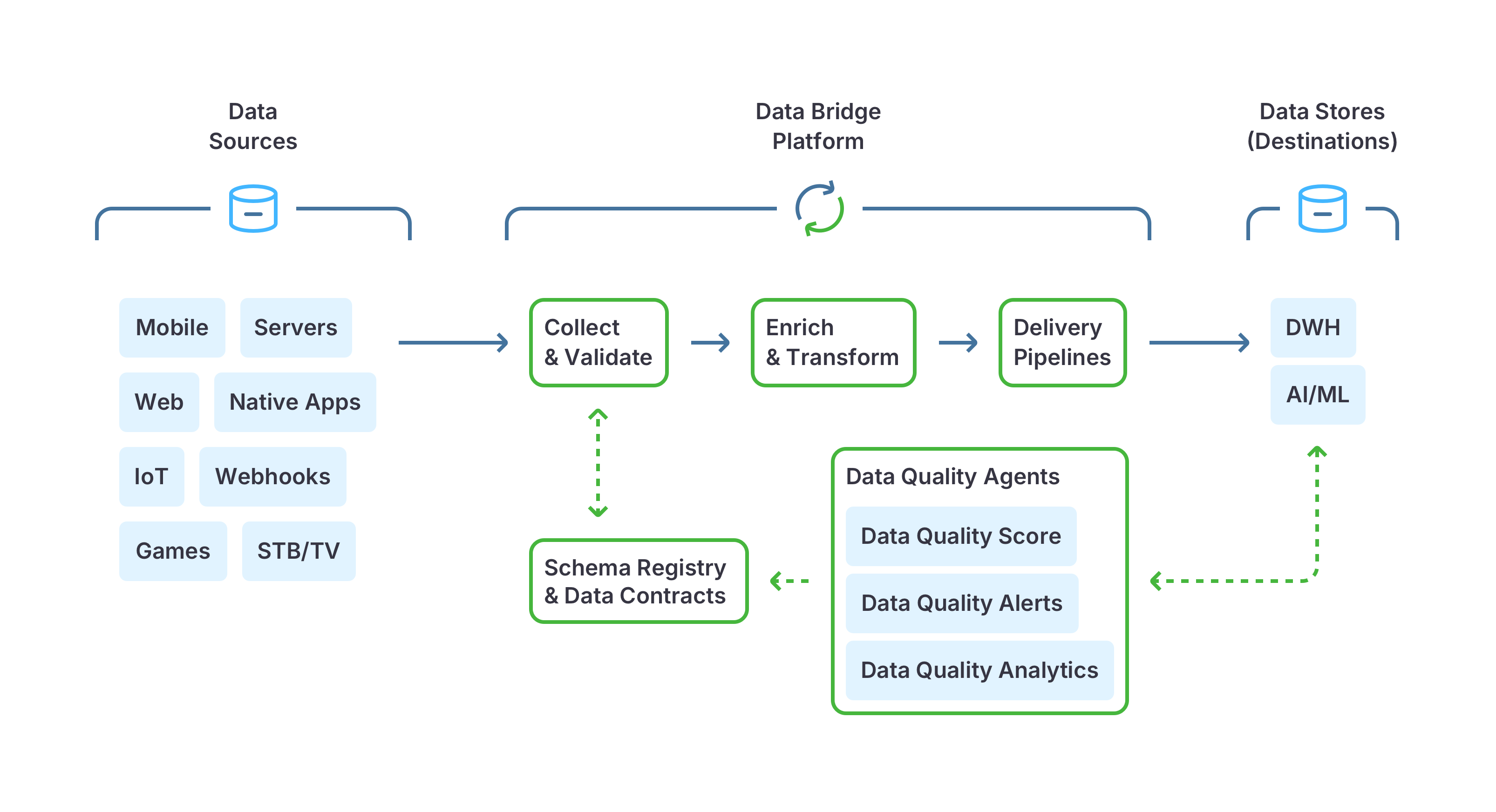
Core Components
- Ingestion Layer: High-throughput event collection from multiple sources (SDKs, APIs, webhooks)
- Schema Registry: Centralized catalog for managing data contracts with version control
- Validation Engine: Real-time schema validation using JSON Schema specifications
- Transformation Pipeline: Enrichment and transformation functions (Functions feature)
- Data Destinations: Native connectors for ClickHouse, PostgreSQL, MySQL
- Quality Monitoring: Continuous profiling and monitoring of data at rest in your warehouse
How DataBridge Works
1. Define Event Schemas
Create data contracts using JSON Schema to define the structure, types and validation rules for your events:
{
  "$schema": "http://json-schema.org/draft-07/schema#",
  "type": "object",
  "properties": {
    "user_id": {"type": "string"},
    "product_id": {"type": "string"},
    "amount": {"type": "number", "minimum": 0},
    "currency": {"type": "string", "enum": ["USD", "EUR", "GBP"]}
  },
  "required": ["user_id", "product_id", "amount"]
}
Key capabilities:
- Version management: Track schema evolution over time
- Backward compatibility: Ensure changes don't break downstream systems
- Documentation: Auto-generated docs from your schemas
2. Collect Events from Any Source
DataBridge provides comprehensive SDKs and ingestion methods:
Client-side SDKs:
- JavaScript/TypeScript (Browser, Node.js)
- iOS (Swift, Objective-C)
- Android (Kotlin, Java)
Server-side SDKs:
- Python, Ruby, Go, Java, PHP, .NET
Other ingestion methods:
- HTTP API for custom integrations
- Webhooks for third-party services
- Built-in trackers with predefined schemas
Example (JavaScript):
databridge.capture('tech.databridge/purchase_completed/1-0-0', {
  user_id: 'user_123',
  product_id: 'prod_456',
  amount: 99.99,
  currency: 'USD'
});
3. Validate in Real-Time
Every event is validated against its schema before reaching your warehouse:
- Type checking: Ensure correct data types (string, number, boolean, etc.)
- Required fields: Reject events missing critical fields
- Format validation: Validate emails, URLs, dates, enums, regular expressions
- Range checks: Enforce min/max values, string length, array size
- Custom rules: Complex validation logic using JSON Schema
Invalid events are:
- Blocked from your warehouse (preventing data pollution)
- Sent to dead-letter queues for review
- Logged with detailed error messages
- Surfaced in monitoring dashboards
4. Transform & Enrich
Apply real-time transformations before data reaches destinations:
Built-in enrichments:
- PII Pseudonymization: Hash sensitive fields automatically
- IP Anonymization: Remove last octets for GDPR compliance
- Geo-location: Add country, region, city from IP addresses
- User-Agent Parsing: Extract browser, OS, device information
- Campaign Attribution: Capture UTM parameters and marketing channels
Custom transformations (Functions):
// Example: Add derived fields
function transform($event) {
  $event.total_with_tax = $event.amount * 1.08;
  $event.event_date = new Date().toISOString();
  return $event;
}
Data filtering:
- Remove bot traffic based on patterns
- Filter test events in production
- Deduplicate events by ID
- Sample high-volume events
Pay only for delivered events - filtered/rejected events don't count toward billing.
5. Deliver to Data Warehouses
Stream validated, enriched data to your warehouse with native connectors:
Supported destinations:
- ClickHouse: High-performance analytics with batch inserts
- PostgreSQL: Direct streaming or batch delivery
- MySQL: Batch delivery with automatic table creation
Delivery features:
- Automatic schema evolution (add new columns)
- Upsert operations for event updates
- Partitioning and clustering optimization
- Retry logic with exponential backoff
- Exactly-once delivery semantics
6. Monitor Data Quality at Rest
Beyond event validation, DataBridge continuously monitors data already in your warehouse:
Automated data profiling:
- Data types and schema drift detection
- Completeness (null/blank value counts)
- Distribution (min/max/avg, standard deviation, percentiles)
- Cardinality (unique values, most frequent values)
- Freshness (last updated timestamp, staleness detection)
- Volume anomalies (unexpected spikes or drops)
Quality checks:
- Custom quality rules and thresholds
- Trend analysis and quality scoring
- Historical tracking and reporting
Real-time alerts:
- Email, Slack, webhook, or Telegram notifications
- Configurable thresholds per metric
- Per-dataset alert destination configuration
Main Concepts
Event Schema and Schema Registry
The Schema Registry is your centralized catalog for data contracts:
- Version control: Track schema changes over time with semantic versioning
- Backward compatibility: Validate that new versions don't break existing integrations
- Documentation: Auto-generated, always up-to-date schema documentation
Learn more about Event Schemas →
Data Sources
Data Sources define where your events originate:
- SDK sources: Browser, mobile apps, server-side applications
- API sources: Custom integrations via HTTP API
- Webhook sources: Third-party services (Stripe, Shopify, etc.)
- Built-in trackers: Pre-configured schemas for common use cases
Each source has:
- Unique API key for authentication
- Rate limiting and quota management
- Monitoring dashboards (volume, errors, latency)
Learn more about Data Sources →
Data Destinations
Data Destinations are where validated events are delivered:
- ClickHouse
- PostgreSQL
- MySQL
- More destinations are coming soon!
Destination configuration includes:
- Connection credentials and security settings
- Batching configuration
- Error handling and retry policies
Learn more about Data Destinations →
Data Transformers (Functions)
Functions allow you to transform, enrich, or filter events in real-time:
- Enrichment: Add derived fields, lookup external data
- Transformation: Modify field values, restructure objects
- Filtering: Remove unwanted events based on conditions
- Validation: Apply custom business logic validation
Functions are written in JavaScript and executed in a secure sandbox:
function transform($event) {
  // Enrich with calculated fields
    $event.revenue_usd = $event.amount * $event.exchange_rate;

  // Filter test events
  if ($event.user_id.startsWith('test_')) {
    return null; // drop unwanted event
  }

  // Add new field
  $event.processed_at = new Date().toISOString();

  return $event;
}
Learn more about Data Transformers →
Data Pipelines
Pipelines connect sources, transformations and destinations:
Source → [Schema Validation] → [Functions] → Destination(s)
Pipeline features:
- Multi-destination: Send events to multiple warehouses
- Transformation chains: Apply multiple functions in sequence
- Pipeline monitoring: Track throughput, latency, errors
- Dead-letter queue: review and fix undelivered events
Learn more about Data Pipelines →
Data Quality Monitoring
Quality Monitoring provides continuous oversight of warehouse data:
- Automated profiling: Daily/hourly scans of your tables
- Custom checks: Define your own quality rules
- Quality dashboards: Visual trends and quality scores
- Alerting: Proactive notifications when quality degrades
Unlike event-only platforms (Segment, Snowplow), DataBridge monitors data quality across the full pipeline - from ingestion through to tables at rest.
Deployment Options
DataBridge offers flexible deployment to meet your security, compliance and operational requirements:
1. DataBridge Cloud (Fully Managed)
Best for: Most teams wanting zero-ops simplicity
- Fully managed infrastructure on AWS/GCP
- Automatic scaling and updates
- 99.9% uptime SLA
- Built-in monitoring and alerting
- No DevOps required
Get started: cloud.databridge.tech
2. DataBridge Private Cloud
Best for: Enterprise customers with custom requirements
- Dedicated infrastructure in DataBridge Cloud
- Single-tenant deployment
- Custom security controls
- Enhanced SLAs and support
- SOC 2 / HIPAA / GDPR compliance
Contact us for Private Cloud →
Key Benefits
For Data Engineering Teams
- One platform: Replace 2-3 separate tools with one
- Better data quality: Validation at the source + monitoring at rest
- Faster setup: SDKs, schemas and transformations ready to go
- Full visibility: Observability from events to warehouse tables
For Data Analysts
- Trusted data: Only validated events in your warehouse
- Self-service schemas: Browse documentation and understand data contracts
- Quality dashboards: See data freshness, completeness, accuracy at a glance
- Fewer surprises: Catch problems before they break reports
For Business Stakeholders
- Lower costs: Significantly cheaper than other tools for event-heavy applications
- Quick start: Deploy in minutes, not weeks
- No DevOps required: Fully managed platform
- Predictable pricing: Transparent, event-based billing
Getting Started
Ready to improve your data quality? Here's how to get started:
- Sign up for early access - Join our closed beta
- Define your first schema - Create data contracts
- Install SDK - Start tracking events
- Connect your warehouse - Link PostgreSQL, ClickHouse, MySQL, etc.
- Enable quality monitoring - Monitor existing tables
Questions? Contact us at hi@databridge.tech